Introduction to Claude Code and Codex
Notes from “Agent’s Adventures in Coding Land,” a seminar given on September 13, 2025. A practical introduction to terminal coding agents: memory, permissions, custom commands, MCP, and how Claude Code and Codex complement each other. Product details reflect the talk date.
 By Wenhao Chai
From autocomplete to agents
AI-assisted coding and autonomous driving have followed parallel tracks. Coding assistance moved from IDE autocomplete in the 1990s through IntelliSense, TabNine, and GitHub Copilot to terminal agents like Claude Code in 2025; driving moved from cruise control through lane assist and Tesla Autopilot toward full autonomy. Both tracks tell the same story: assistance that once reacted keystroke by keystroke now plans and acts over long horizons.
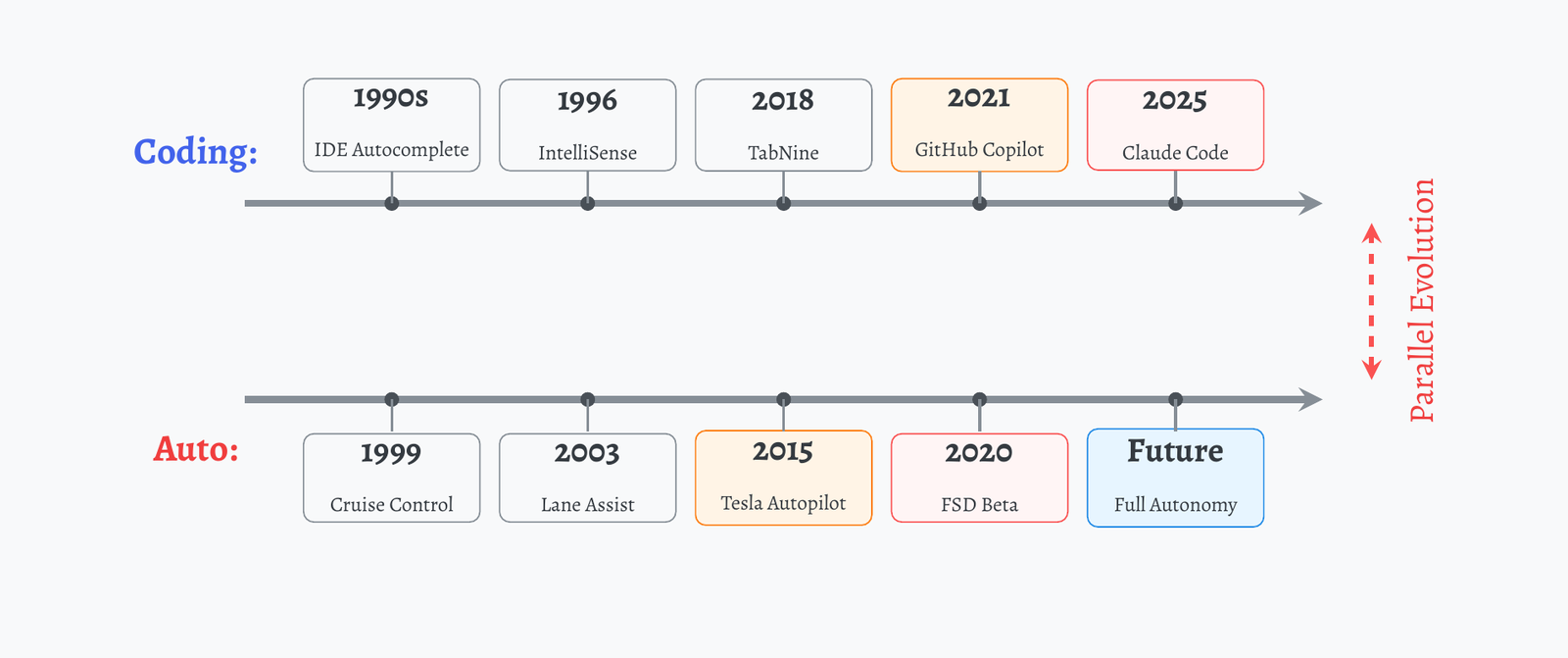
The autocomplete era looked like this: you type a prefix, the IDE ranks completions from documentation, and you pick one.
# User types:  "model = nn.Tra" + Ctrl+Space
model = nn.Tra|

# IDE intelligent suggestions
Transformer(d_model, nhead, ...)   ← selected
TransformerEncoder(encoder_layer, num_layers)
TransformerDecoder(decoder_layer, num_layers)

# Auto-completion with parameter hints:
model = nn.Transformer(
                d_model=|, # int:  model dimension
                nhead=8,   # attention heads
                )
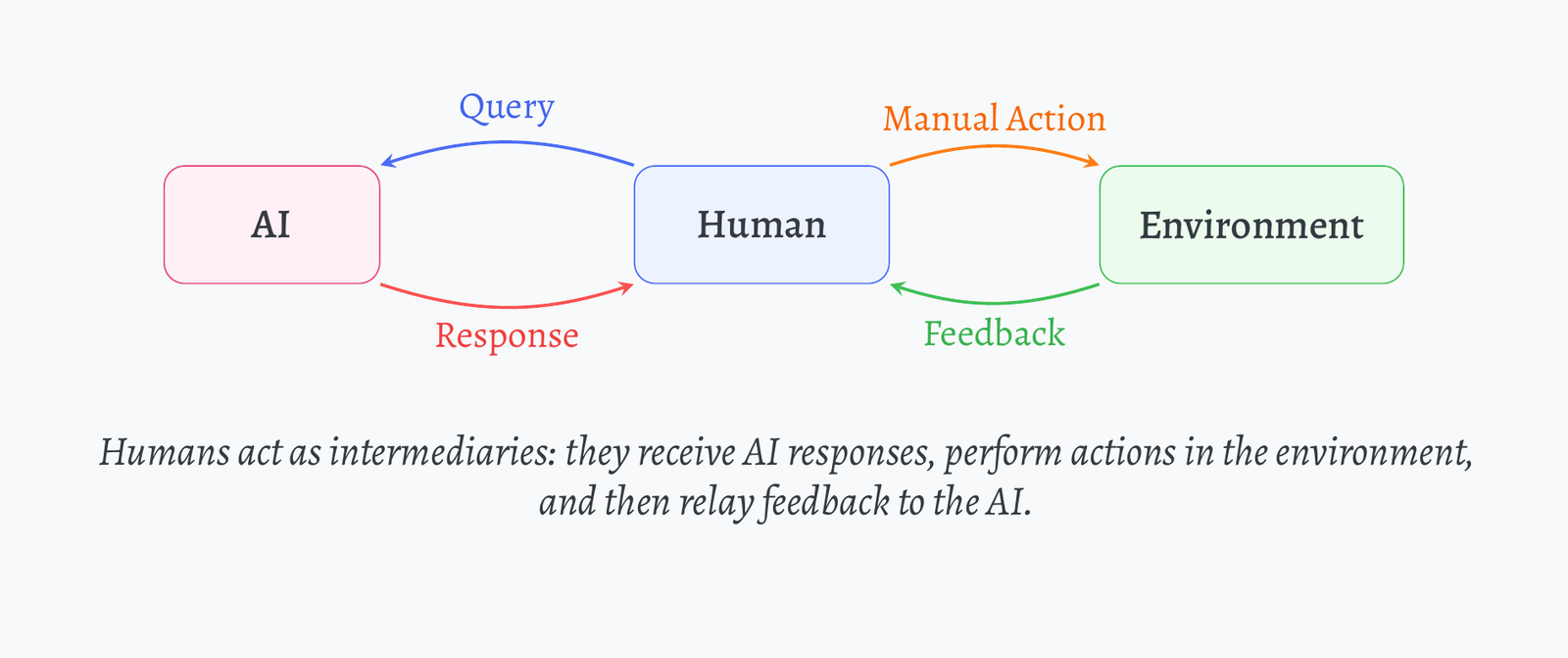
What changed with agents is the position of the human in the loop. In the traditional arrangement, the human sits between the AI and the environment: the model answers a query, the human performs the action and relays the result back.
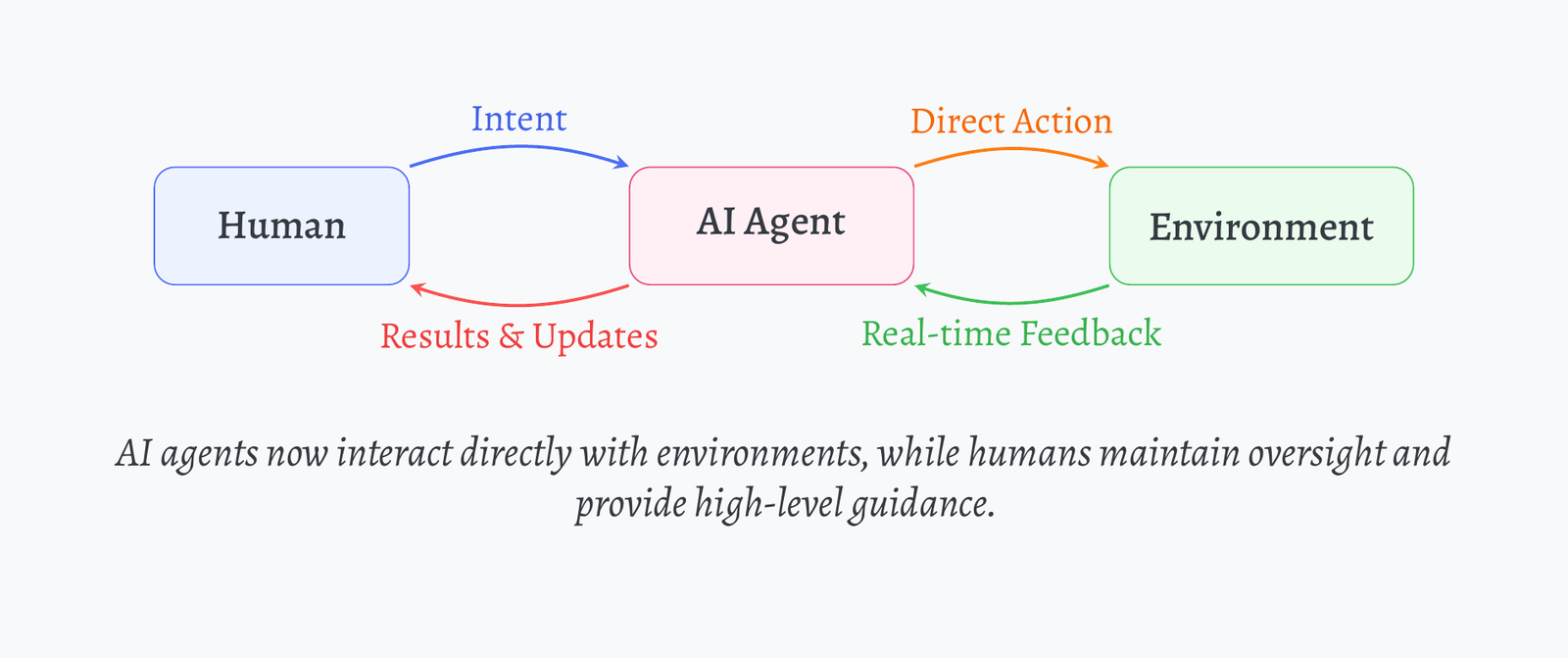
Agents collapse that relay. The model acts on the environment directly, reads the feedback itself, and reports results; the human supplies intent and oversight rather than keystrokes.
Claude Code: an agent in the terminal
Claude Code is that agent loop packaged as a terminal program. You talk to it in natural language, as simple as you are a five-year-old child; it reads files, edits them, runs commands, and reports back.
✱ Welcome to Claude Code!

  /help for help, /status for your current setup

  cwd: /Users/reself

> Hello World!Install in terminal by npm install -g @anthropic-ai/claude-code. Login with a Claude account ($20 per month). No extra cost.
Memory
The agent keeps three layers of memory, and knowing where each lives saves repeated explanations:
- Global memory:
.claude/CLAUDE.mdin your home directory; - Local memory:
CLAUDE.mdwithin each project root; - Session context: maintained during active conversations.
Use /init to create CLAUDE.md before you start.
Use # <sth> to add something to memory directly, or let the agent do it for you.
Permissions
Every tool call passes through a permission layer you configure once and refine over time. Allow the harmless, ask on the consequential, deny the dangerous:
"permissions":  {
    "allow":  ["Bash(ls:*)", "Bash(git status:*)", "python:*"],
    "ask":    ["Bash(git commit:*)", "Bash(sbatch:*)"],
    "deny":   [],
    "additionalDirectories":  ["/mnt/..."]
}Gradually refine your permission settings through daily use. Never set auto-accept in a single session.
Custom commands
Frequent tasks become slash commands: write a markdown file describing the task, store it in .claude/commands, and it becomes invocable. Both global and local commands are supported. A cluster-status checker, for example:
# Check SLURM Jobs            → saved as check-slurm.md, invoked as /check-slurm
Check my current SLURM job status and queue information.
Direct squeue command without bashrc dependencies.
## Command
squeue -u <your-id>
Statusline
The statusline turns the terminal footer into a dashboard. Mine shows running costs, the current todo, live SLURM jobs, and recently finished runs:
CLAUDE COSTS
Today    $8.56
Total    $231.53

TODO LIST
increasing batch size?

SLURM JOBS
loopb4p4s416e4               8:17:54    H100x4
loopb4p4s416e4_le_iiadd_ni   QUEUE #4   H100x4

RECENT COMPLETED
loopb4p5s216e5 8h agoUse /statusline to set the statusline.
Configure your own statusline display.
Image input
Claude Code accepts images: paste a screenshot with ctrl+v and reference it in the prompt.
> [Image #1] Please analyze this screenshot
and help me recreate the layout in CSS.Image input is quite unreliable; avoid it unless you have to.
MCP: Model Context Protocol
MCP is the universal standard for connecting AI systems with external tools and data sources, with pre-built servers for Google Drive, Slack, GitHub, Git, Postgres, Puppeteer, and more.
Use @mentions to reference MCP resources. What I use frequently is @filesystem and @discord.
Add third-party MCP servers via the official MCP documentation.
Agents
Recurring specialized work deserves its own agent. The /agents interface asks what the agent should do and when it should be used; Claude Code then invokes it automatically when a task matches.
> /agents
Create new agent
Describe what this agent should do and when it should be used (be
comprehensive for best results)

the agent will help me polish the papers by looking a latex-based repo

Press Enter to submit · Esc to go backUse /agents to create detailed and specialized agents for recurring tasks that Claude Code automatically invokes.
Codex
Why run a second agent at all, and how does Codex differ from Claude Code? The short answer from daily use: they have different temperaments, and the difference is exploitable.
Install in terminal by npm i -g @openai/codex. Login with an OpenAI account ($20 per month). No extra cost.
| Claude Code | Codex |
|---|---|
| A much more mature product | Powered by GPT-5 Thinking |
| More like a software engineer | More like a researcher |
| Multi-step planning | Multi-step reasoning |
| Rapid action | Test-time scaling |
| Limited usage | Allow more usage |
Best practice is to use both tools complementarily.
Setup
Launch Codex in the terminal with the codex command, set /model to gpt-5 high for best performance, and configure /approvals to read-only for safety. The three approval modes:
- Read Only: Codex can read files and answer questions; it requires approval to make edits, run commands, or access the network.
- Auto: Codex can read files, make edits, and run commands in the workspace; it requires approval to work outside the workspace or access the network.
- Full Access: Codex can read files, make edits, and run commands with network access, without approval. Exercise caution.
Sharing memory across both tools
Use ln -s CLAUDE.md AGENTS.md to create a symbolic link that allows Codex and Claude Code to share memory.
Outlook
Three reasons to be optimistic about Codex specifically:
- Reasoning: reasoning capabilities with test-time scaling by RL;
- General agent: OpenAI has already built a general agent in web. Web is the next new terminal;
- Multi-modal: OpenAI cares more about multi-modal input and output.
Future agents will cover the vast majority of multi-modal contexts in our daily lives as prefill, and execute through extremely complex environmental interactions. Therefore, we will simultaneously have ultra-long context capabilities. How to handle conflicts between contextual information and pretrained knowledge will also become a key focus for future model development.
Fun fact: the slide deck behind this post was collaboratively created, refined, and polished using Claude Code and Codex.